 IMS5000 Manual
IMS5000 Manual
IMS5000 Manual
This is how to enter and store the text information for printing your product.
Marks also link together the variables you want printed on your product.
All dimensions are specified in inches.

Text
This is actually “Device Text”, it is based on the printer's built in fonts (non-Windows). These fonts can print faster than Windows Fonts, however they are not as visually appealing.
57 characters maximum per line.
Text Marks can consist of static (any alpha-numeric that will be printed without change each print command), serial or keyed variable information.
X
Positions the mark from the left edge of the marking fixture (surface) position. If no value is entered, the default is 0.000.
For example, on a 2.00” x 2.00” marking surface to position a mark 0.50” from the left edge enter 0.50. To position a mark 0.25” from the right edge, enter 1.75.
Y
Positions the mark vertically from the top edge of the marking fixture (surface) position. If no value is entered, the default is 0.000.
For example, if you have a 2.00” x 2.00” marking surface and you want to position the first marked line at 0.50” from the top, enter 0.50.
Z
Positions the height of the print head when it prints the mark.
For example, entering a value of 0.5 will cause the print head to print at a height of 0.5 inches
Font
Specifies the height of the font. The approximate nominal character height for Videojet Systems is as follows:
| Font Size | 100, 170i, 270i | High Resolution |
|---|---|---|
| 3 0f 9 bar-code | medium density | high density |
| 5 x 7 text | 0.70" | 0.35" |
| 7 x 9 text | .125" | .075" |
| 10 x 16 text | .33" | .125" |
| 16 x 24 text | N/A | .220" |
(These are approximate character height, heights vary dur to ink jet system set-up, the substrate material, or the distance from the marking surface.)
Justification
Controls whether the marking line will be (left, center, right) justified. Click on the desired justification in the dropdown.
Char Width
Specifies the character density per inch and the spacing between the characters. Default is 0.100".
MS (Multistroke)
Provides the ability for varying degrees of boldness. The higher the MS value, the more ink will be deposited in the same location (slightly offset), in the same pass. Values can be 1, 2, 3, or 4. In most cases a value of 1 is sufficient.
Note: it will be difficult to print a clear bar-code using multistroke.
Upsidedown
Check to print vertially inverted text. By default this box is unchecked.
Backwards
Check this box to print backward or "mirror image" text. By default this box is unchecked.
Text
Field to enter the text information to be marked. A text line can contain static and variable information.
To use a variable, decorate the name with '%' on each side. for example with a variable D1, "Date: %D1%".
Assigns bar codes to the print output. The density is dependant on the ink jet print resolution.
If you are considering what bar code symbology to use consider:
Click on the bar code type desired from the Bar-Code dropdown menu.

Code 2of5
Have a pattern of alternating narrow and wide bars and can encode more data than symbologies such as Code 39
Code 39
A discrete, self-checking, variable length symbology. Sometimes referred to as "3 of 9 Code".
Standard for the U.S. Department of Defense and widely used.
Code 93
A variable length, four element width, continuous symbology. Code 93 uses four unique circle codes to represent all 128 ASCII characters.
Code 93 is not self-checking. It offers high data security with the use of two modulo 47 check characters.
X and Y res: the x and Y resolution. These indicate character width and height. If you want the mark to appear more condensed along an axis, reduce the resolution. If you want the mark to be more stretched out, increase it. If stitching two overlapping marks together, reduce the Y resolution. If there is a gap between marks, increase the Y resolution.
X Dots: indicates how many dots wide. if a value greater than 1 is indicated, it will make the bars and spaces of the bar code wider, and stretch the entire bar code in the X direction. X dots will not impact the human readable marking.
Y Dots: indicates how many dots wide by dots high. The system will know how many dots wide from the value. Standard configurations are 5 x 7, 10 x 16, and 16 x 24.
Quiet Zone: when a value is entered, allows spacing on either side of the width of the bar code to achieve a good read. This is necessary if anything on the surface could be interpreted as a bar code.
Negative: if checked, will print the reverse of the bar code. Where a mark of ink would be printed is now space and space will now be a mark of ink.
Code 128
A very high density alphanumeric symbology. It has variable length, continuous code with multiple element widths.
Set: indicates the character set that a code 128 mark uses.
Code Set A: includes all of the standard upper case alphanumeric characters and punctuation characters together with the control characters.
Code Set B: includes all of the standard upper case alphanumeric characters and punctuation characters together with the lower case alphabetical characters and control characters
Code Set C: includes the set of 100 digit pairs from 00 to 99 inclusive, as well as three special characters. This allows numeric data to be encoded as two data digits per symbol character.
UPC/EAN
Universal Product Code and European Article Number
UPC-A: Version A of the UPC symbol, encodes 12 digits. Commonly used in U.S. retail markets.
EAN-8 is a superset of UPC adopted for international markets. EAN-13 is currently not supported.
Subtype
Select either "UPC A" or "EAN 8".
Human Readable Format
Specify the human readable format with Xs and spaces.
The human readable information will appear under the bar code in this format when the Overlay HR box is selected.
Overlay HR
If selected, the human readable will appear under the bar code, according to the specified format.

A symbology based on a checkerboard arrangement of black and white squares contained within a rectangular border.
Each symbol has a unique perimeter pattern that is used for finding the symbol and determining the orientation. Data Matrix is designed to be read using vision-based scanning equipment and is omnidirectional.
2D Code Mark Settings
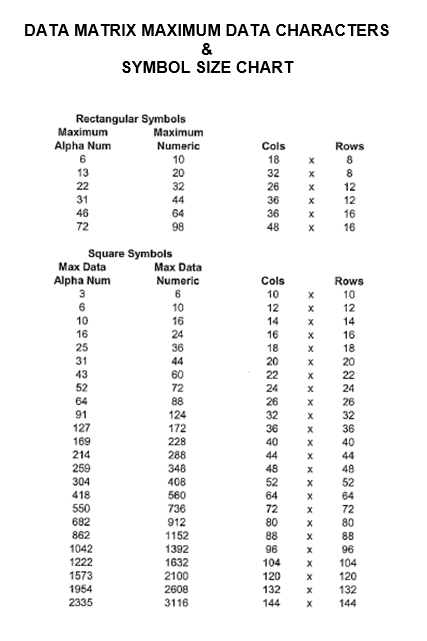
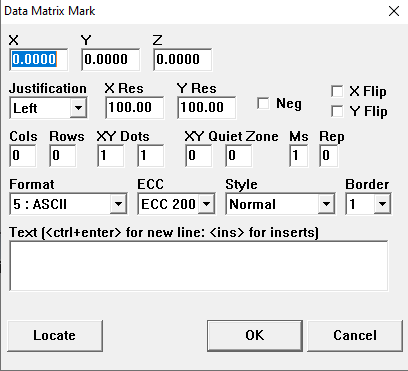 Columns/Rows: Refer to chart below to determine the number of columns and rows needed.
ex: A rectangular data matrix with 22 alphanumeric characters will require a minimum size of 26 columns and 12 rows.
XY Dots: Specifies the number of dots each cell (Row x Column) will be.
ex: 2x2 dots in each cell of column/row
Size larger than 24 dots tall (number of rows times Y-dots) will require multiple passes to complete printing the 2D code
XY Quiet Zone: Allocates an area of empty space around the data being printed
Format:
Negative: prints the 2D code white on black instead of black on white
ECC: Error correction encoders that reconstruct and verify scanned data for improved accuracy, with ECC200 being the current standard
Used for assigning a bitmap (any graphical picture representation) as the print output. IMS5000 supports .BMP graphical files only.
The resolution of the output is dependent on the resolution of the ink jet printer used.
Filename
Identifies the bitmap file to be used to print the desired bitmap picture. The bitmap filename can be comprised of static or variable information.
Multiline
Provides the ability to use ink jet printers internal MultiLine printing. When using MultiLine the spacing between lines is preset and cannot be changed.
Cell Width
Identifies the width of the cells.
Allows the use of standard Windows fonts such as "arial" rather than the integrated fonts of the printer
Expand
Allows the expansion of text by inserting a number of spaces between the characters. The default is 0.
Provides the ability to mark a rectangular patch of ink.
X and Y Size
This X and Y control the dimensions of the patch.
Click to read more on New Programs.