 IMS5000 Manual
IMS5000 Manual
IMS5000 Manual
Program variables come in different types (Keyed, Serial, Date, Time, Based Serial).
This section will cover the Name and Global attributes of variables and the OK and Cancel buttons. Read below for further details on each type.
Name
The maximum length a variable name can be is 16 characters.
The name of the keyed variable that will be displayed in the variables section of the Program Editor. By default, IMS5000 will assign an indexed name to each variable. When naming a variable, the name should have clear intent for all operators.
Global
Check if you want to use the variable value "globally", within the entire program. For example, a Date variable is encouraged to be global, because it will be the same value for each part.
If you want to assign the variable value for each part printed within the program, ensure that Global is unchecked.
OK
After all needed information for the variable is entered, click on OK to have the variable available in the variable field of the Program Editor.
Cancel
Allows the user to cancel out of creating a variable.
This type is for information that may change from one part to another or from one lot to another. The word "keyed" refers to keying in or typeing a string of letters or numbers.
Types of Keyed variables include a lot numbers, non-sequential serial numbers, product names, customer numbers, and data codes.
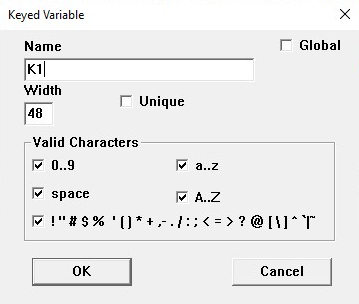
Width
Indicates the maximum number of characters in the field, this can be a value between 1 and 48.
When the actual width is not known, it is better to use a larger number than expected.
Valid Characters
Specifies which characters are valid, whether that be letters, digits, spaces, or special characters. Uncheck each box for characters that are not valid. And, ensure boxes are checked for desired characters.
Corresponds to incremental numberid information that changes in sequence (part to part or lot to lot).
Serial is not recommended for randomly changing numeric information.
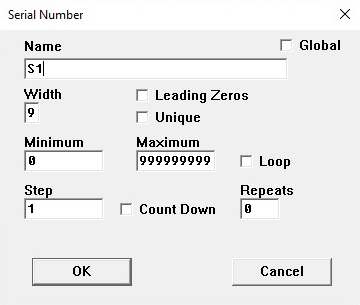
Width
Indicates the maximum width of characters for the serial field. The maximum width allowed is 9 with a maximum number of 999,999,999. The width can be as low as 1 and any value between 1 and 9.
Leading Zeros
If this box is checked, all numbers will be padded with zeros to be a uniform, set width. For example, if the width is 4 and the serial number is 27, the variable value would be "0027".
If you do not want leading zeros, ensure this box is unchecked.
Minimum
The starting number (or lowest number) to be printed for the production run.
Maximum
The highest number, without repeating numbers, to be printed for the production run.
Loop
If this box is checked, the program will return to the starting number after printing the maximum number.
If "Loop" is unchecked, after the maximum number has been achieved each following print would used the maximum number.
Step
Increases (increments) the serial number by the integer specified.
"Step 1" would increment each serial number by 1, "Step 5" will increment each serial number by 5, etc.
Count Down
If this box is checked, the serial number will start at the maximum value and decrease to the minimum value each step.
Repeats
Specifies how many times a value will be printed (1 + value) during a marking cycle, before a step value increases/decreases the serial number.
A repeat value is ideal for serializing multiple parts with the same serial number. For example, a value of 5 Repeats would print 6 parts with the same serial number.
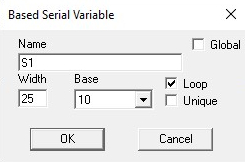
Base
Click on the arrow to see the available bases in the INI file. Select the base you would like to use for the serial variable.
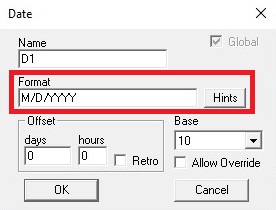
Format specifies how the date will appear. General characters will be accepted as is, '/' above will show as a slash. However there are reserved characters to specify how you want the date to be formatted:
Years
Months
Days
Weeks
Miscellaneous
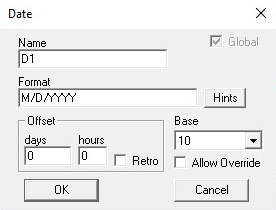
Offset
Used to indicate an offset from the actual date, in days and hours. By default this specifies a date in the future.
Checking the Retro field will specify that the offset is a date in the past.
Base
Click on the arrow to see the available bases in the INI file. Select the base you would like to use for the date variable.
Note: for ISO calendar 2-digit weeks make sure to select base "10_ISO".
Allow Override
If this box is checked, the operator can override the date generated by the system at run time.
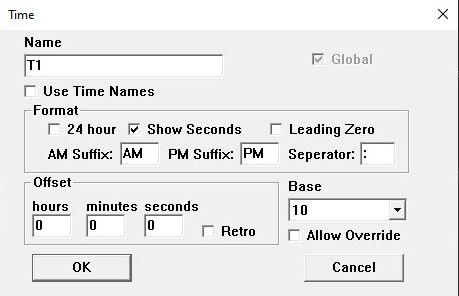
Use Time Names
If selected, the system will assign the variable the name of the time/shift to the given time as specified by the system administrator in the INI file.
Format
Specifies the format the time will appear in.
Offset
Used to indicate an offset from the actual time, in hours, minutes, and seconds. By default this specifies a time in the future.
Checking the Retro field will specify that the offset is a time in the past.
Allow Override
If this box is checked, the operator can override the date generated by the system at run time.
Click to read more on New Programs.