Manage Users
Note: only users of security level 4 can view, add, edit, or delete users.
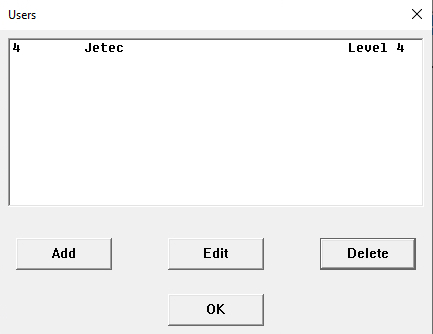
Click on ‘Users!’ in the ribbon to open the Users window.
Here you can add, edit, or delete users. To leave the window, click ‘OK’.
Adding Users
Within the window you can tab, pivot with Alt +, or click between fields.
-
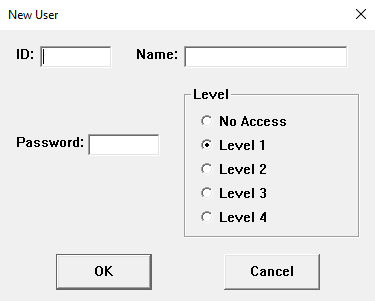
To add a user, click the 'Add' button and the New User window will be displayed.
-
ID (up to eight characters long)
input an ID for the user.
-
Name (up to twenty characters long)
input the name of the user.
-
Password (up to eight characters long)
create the desired password for the user.
SECURITY LEVELS
-
Level 0
provides the user with no access. Useful for temporary restriction of a specific user, if they are temporarily removed from the marking system or on vacation.
-
Level 1
provides basic access. A user with Level 1 is limited to running existing files. Ideal for users who do not create or edit files.
-
Level 2
provides execution and database access. A user with Level 2 can run files and access database functions on systems equipped with JET databases.
-
Level 3
provides execution, database, program creation access. A user with Level 3 can create programs and fixtures.
-
Level 4
provides administration access. A user with Level 4 has full access to IMS5000 functions. This includes the adding and removal of users.
Editing or Deleting Users
To edit a user, click on the line representing that user. Then click on "Edit" to bring up the window.
To delete a user, click on the line representing that user. Then click on "Delete".
 IMS5000 Manual